We have taken the granularity of access rights in Symfio to the maximum. You can now hide absolutely everything from a user – data sources, settings, plans, forecasts, mapping – and leave just one specific dashboard visible. Whether straight from Symfio or embedded from Power BI.
What it means in practice
Until now, every user saw at least the basic navigation in the interface – overviews, plans, profile settings. Now an administrator can reduce the interface to a single screen. The user sees exactly what the admin assigns – nothing more, nothing less.
No detours, no looking at other people’s reports, no risk of someone clicking through to sensitive settings.
How it works
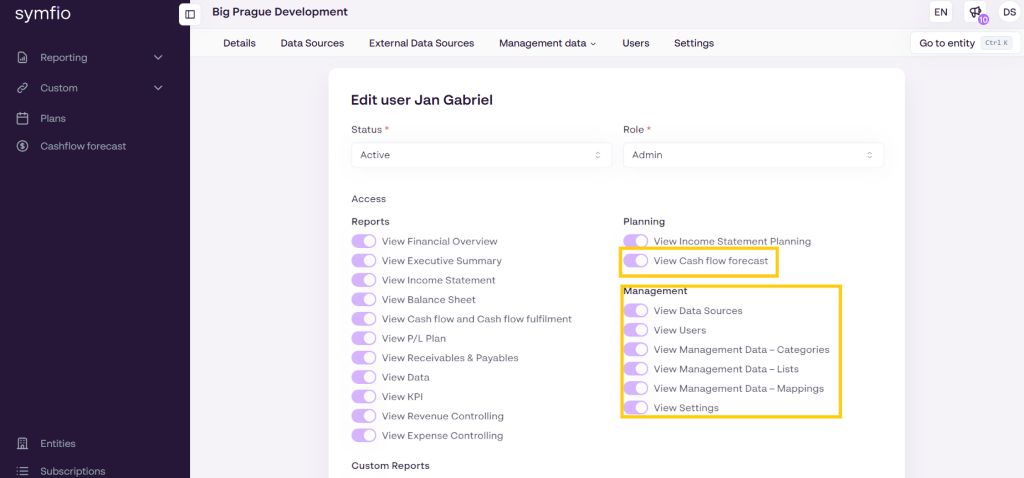
- In the user settings, the administrator chooses one specific dashboard to be visible.
- Hides everything else – data sources, settings, plans, forecasts, mapping, other reports.
- Gives the user the Viewer role – they can only view, not edit.
- The dashboard can come straight from Symfio, or it can be a Power BI report embedded in Symfio.
- The configuration can be changed at any time – the scope of access can later be widened or narrowed as needed.
When it comes in handy
- Owners and investors without operational detail
A shareholder or financial investor needs to see top-line KPIs – cash flow, EBITDA, plan vs. actuals. They don’t need to understand account mapping, planning scenarios or data source configuration. Assign them one executive dashboard and they have exactly what they need.
- Department managers
The Sales Director sees their revenue dashboard, the Operations Manager their KPI dashboard, the HR Director their headcount report. Everyone sees only what concerns them – without noise from other departments’ reports.
- Members of the board of directors and supervisory board
A single consolidated dashboard is often enough for the quarterly board pack. Board members don’t need to understand how the data is put together – they need the resulting picture for strategic decisions.
- External parties with limited access
Auditor, bank, tax adviser, advisor. Assign them the specific dashboard or report they need – and they can’t get to anything else. Simple control of scope, a clean audit trail.
- Power BI dashboards outside Symfio consolidation
Do you have a separate report built in Power BI – operational KPIs, marketing, HR analytics, production data? Embed it in Symfio and assign it to a specific user. They have a single login to one tool and see exactly their report.
- Onboarded users without full training
A new colleague who needs to see one specific report but has no capacity to go through full Symfio training. They get a reduced interface with one dashboard, and the scope can be widened gradually as their needs grow.
- Clients of accounting and advisory firms
If you run Symfio for your clients as an accounting firm or CFO-as-a-service, you can assign each client exactly the dashboard you prepare for them. With no risk that they see another client’s data or interfere with the mapping.
Why it makes sense
- Less cognitive noise for users – they see exactly what they should see.
- Better data security – nobody sees mapping, scenarios or settings they don’t need.
- Simpler training – if someone is meant to see one dashboard, you don’t need to teach them all of Symfio.
- Consolidated tools – Power BI reports and Symfio dashboards under one login, one role and one access management.
- Lower risk of human error – users can’t change what they can’t see.
How to start
The administrator manages the settings in the users section. Give the user the Viewer role, choose the dashboard they should see and hide the rest of the interface. If you have questions, contact support or your account manager.
The feature is available to all Symfio clients. No upgrade needed.
