Before you start
- Permission: company Administrator (or a user with the
View settingsaccess enabled). - Time required: 5 minutes.
- Prepare: the structure of your chart of accounts (revenue and expense classes), the way cost centres are numbered and, if applicable, the amount of your overdraft facility.
Warning: Settings affect the calculation of all reports of the company. Make changes deliberately and check the Income statement after saving.
Opening the settings
- Open Companies in the left menu and click the company (or press Ctrl + K).
- Go to the Settings tab.
- Edit the required fields (see the table below).
- Click Save settings.
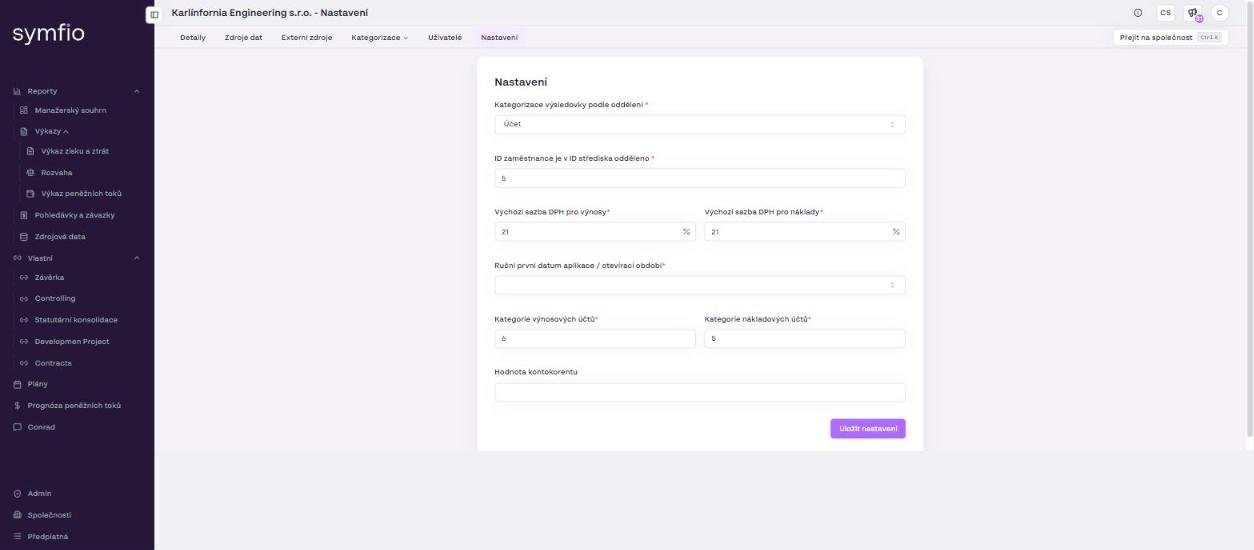
Meaning of the fields
| Field | What it means | Typical value |
|---|---|---|
Income statement categorization by department (Kategorizace výsledovky podle oddělení) |
The dimension used to assign journal entries to income statement categories. The default Account means the account number decides the category, according to the table on the Categorization › Mappings tab. |
Account |
Employee ID is separated in the cost centre ID (ID zaměstnance je v ID střediska odděleno) |
If your accounting encodes the employee into the cost centre ID (for example 12345-07), enter the number of characters that make up the cost centre itself. Symfio uses it to separate the cost centre from the employee identifier. |
5 |
Default VAT rate for revenue |
The rate in % that Symfio uses to estimate output VAT on planned revenue in the cash flow forecast. | 21 |
Default VAT rate for expenses |
The rate in % that Symfio uses to estimate input VAT on planned expenses in the cash flow forecast. | 21 |
Manual first application date / opening period (Ruční první datum aplikace / otevírací období) |
The date from which Symfio processes accounting data and takes opening balances. Entries before this date are not loaded into the statements. | 1 January of the first reported year |
Revenue accounts category (Kategorie výnosových účtů) |
The account class Symfio treats as revenue. In the Czech chart of accounts this is class 6 (accounts 6xx). | 6 |
Expense accounts category (Kategorie nákladových účtů) |
The account class Symfio treats as expenses. In the Czech chart of accounts this is class 5 (accounts 5xx). | 5 |
Overdraft value (Hodnota kontokorentu) |
The amount of the overdraft facility. It is added to available cash in the cash flow forecast so that you see the funds you can actually use. | 0 or the facility amount |
Revenue and expense account classes
The Revenue accounts category and Expense accounts category fields tell Symfio which accounts make up the income statement. For Czech and Slovak accounting keep the values 6 and 5. If you use a different chart of accounts (for example a foreign entity with another structure), enter the corresponding class – otherwise the accounts will not appear in the Income statement and will end up in the Unassigned expenses row.
VAT rates
The default VAT rates are used only for the cash flow forecast: from planned revenue and expenses Symfio estimates the VAT that will have to be paid or can be reclaimed. If most of the company’s supplies fall under a different rate (for example a reduced rate or exempt supplies), set the rate that matches the majority of turnover. Actuals from accounting are not affected by these values.
Opening period
The Manual first application date / opening period value defines the start of the data. Set it to the beginning of the first year you want to see in the reports. If you connect historical data covering several years but leave a later date, the older years will not appear in the reports.
Overdraft
The Overdraft value increases available cash in the cash flow forecast by the agreed credit facility. Enter the amount in the company currency. If the company has no overdraft, leave 0.
Edit company and Links
The Settings tab deals with data processing. The basic company details are on the Details tab:
- Edit company – the button on the Details tab opens a form with the same fields as when adding a company (Subscription, registration number, Name, VAT ID, Street, Country, Currency, Logo, Parent entity, Income statement subcategorization). Save the changes with Edit company.
- Links – a section on the Details tab with the + Add link button. Use it to store links to documents and systems related to the company (for example a shared folder with closing reports).
A detailed procedure is in Adding a company.
Tips and common mistakes
Tip: After changing account classes or the opening period, check Accounting data update at the bottom of the report and wait for the next data load – the changes are reflected only after the update.
Note: If the Income statement shows a large Unassigned expenses item, the cause is usually missing account mapping (Categorization › Mappings), not the account class settings. Check the mapping first.
Frequently asked questions
Do I have to fill in the settings for every company in a group?
Yes. Settings are bound to a company. For a group of companies with the same accounting methodology, use the same values.
Why don't the reports show data for older years?
Check Manual first application date / opening period – data before this date is not processed. Also verify the period set on the data source (Period from / Period to).
Do the VAT rates affect the actual figures in the statements?
No. They are used only to estimate VAT in the cash flow forecast. The actual statements are based on booked values.