Before you start
- Permissions: the Administrator role for the given company (permission View management data categories).
- Time required: 10–20 minutes, depending on the number of custom categories.
- What to prepare: a list of the subcategories you want to track separately in the income statement, including their Czech and English names.
Opening categories
- In the left menu click Companies and select a company.
- In the company detail open the Categorization tab.
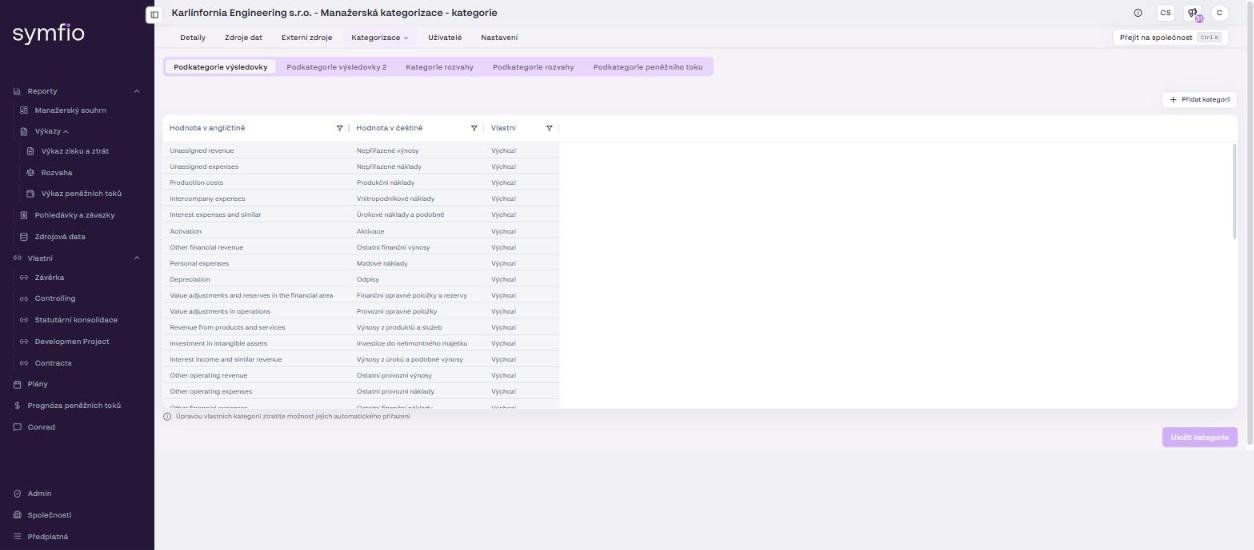
- From the drop-down choose Categories. An overview of categories opens, split into several tabs.
Tip: You are not mapping accounts yet in this part. First prepare the category structure into which you will map data in the next step (Mapping accounting data).
Overview of tabs
| Tab | Use |
|---|---|
| PL Subcategories (Podkategorie výsledovky) | Subcategories used for the first level of income statement breakdown. |
| PL Subcategories 2 | Second, more detailed level of income statement subcategories. |
| BS Categories | Categories for the balance sheet. |
| BS Subcategories | Subcategories for the balance sheet. |
| CF Subcategories | Subcategories for the cash flow statement. |
To set up the income statement by category, work with the PL Subcategories tab and, if needed, PL Subcategories 2.
PL Subcategories tab
The table contains these columns:
| Column | Meaning |
|---|---|
Value in English |
Category name in English (shown in the English version of the application). |
Value in Czech |
Category name in Czech. |
Custom |
Whether it is a system category (Default) or a category created by the client (Custom). |
The list contains predefined items such as Unassigned revenue, Unassigned expenses, Interest expenses and similar or Production costs. These show Default in the Custom column. Custom items in the Karlínfornia demo include, for example, Bank fees, IT and software or Engineering.
Important: Default categories are system categories and cannot be changed. Only categories marked Custom can be edited. Moreover, editing a custom category removes the option of assigning it automatically – the application warns about this directly below the table.
Adding a custom subcategory
If you need to track costs or revenue in more detail, create a custom subcategory.
- Open the PL Subcategories tab.
- Click + Add category in the top right.
- Fill in the name of the new category in English and in Czech and confirm with Add category.
- Check that the new item shows Custom in the
Customcolumn. - Click Save categories in the bottom right.
Tip: Name subcategories according to how you want to read costs and revenue in the income statement. For example, instead of one generic “Marketing” category you can create separate subcategories “Online advertising”, “Events” and “PR”.
PL Subcategories 2 tab
The PL Subcategories 2 tab provides a second, more detailed level of income statement breakdown. Use it when one level of subcategories is not enough for the report structure you need. For example:
| PL Subcategory | PL Subcategory 2 |
|---|---|
| Marketing | Online advertising |
| Marketing | Events |
| Personnel costs | Salaries |
| Personnel costs | Bonuses |
- Click the PL Subcategories 2 tab.
- To add a custom item click + Add category.
- Fill in the category names in English and in Czech and confirm.
- Save the changes with Save categories.
Note: Here too, only items marked Custom can be edited. The predefined items (Unassigned expenses, Unassigned revenue) cannot be changed.
Frequently asked questions
Can I delete or rename a default category?
No. Default categories are system categories. If they do not suit you, create a custom subcategory and map accounts to it; simply leave the default category unused.
Why do I have to fill in the English name as well?
Symfio has both a Czech and an English version (language switch in the header). Each category is shown in reports in the language the user has selected.
Where will I use a custom category?
Under Categorization › Mappings in the PL Subcategory and PL Subcategory 2 columns, when creating custom reports, and as a dimension of income statement plans.