Before you start
- Permissions: every Symfio user can use Conrad. It answers only from companies you have access to. What you cannot see in reports, Conrad cannot see either.
- Time required: a simple answer within a minute, a more complex analysis 1–3 minutes.
- What to prepare: a specific question – which company, which period, what you want to know.
The Conrad screen
Open Conrad from the Conrad item in the left menu.
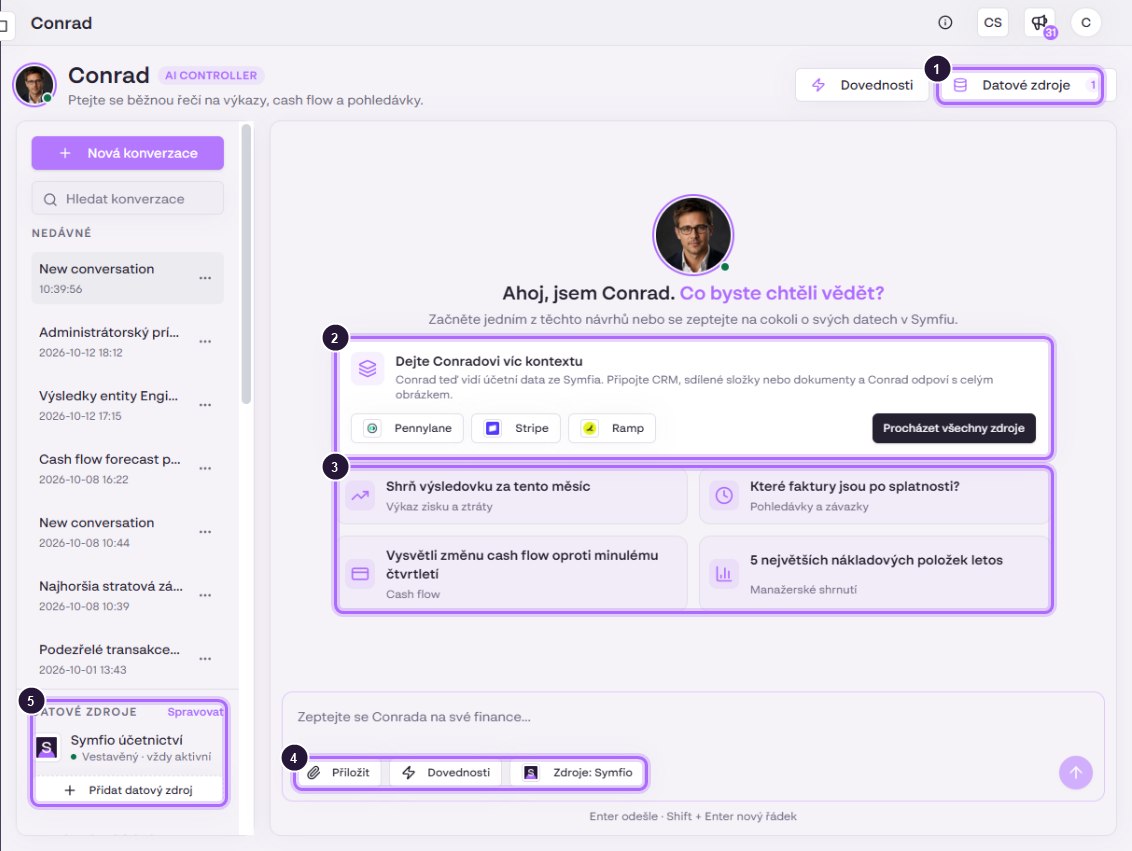
- Data sources (Datové zdroje) in the header: overview and connection of additional data sources (see Conrad data sources). The number shows active sources.
- The Give Conrad more context card with quick connection of recommended sources and the Browse all sources button.
- Four suggested questions, each tagged with the report it is based on.
- The input field with Attach (file), Skills and Sources (which sources Conrad uses in this conversation).
- The Data sources panel in the left column: the built-in Symfio accounting source (always active), the Manage link and Add data source.
The left column also contains New conversation, Search conversations and the RECENT list. The … menu of a conversation offers Rename and Delete.
Your first conversation
- Click a suggestion or type your own question into Ask Conrad about your finances…
- Name the company and period, e.g. “Prepare a monthly commentary on the income statement of Karlínfornia Engineering for August 2026 against the plan.”
- Send with Enter. Insert a new line with Shift+Enter.
- While working, Conrad shows what it is doing, and under the answer there is an expandable Steps · N list with the individual data queries. Above the answer, Searched: lists the sources used.
- If the question is ambiguous, Conrad asks back (e.g. which of two plans to use). Reply in the same conversation.
Conrad remembers the context of the conversation, so you can follow up with “and now the same for July”. For a different topic start a New conversation; Conrad names it after the first question.
Conrad as support for working with Symfio
You can also ask Conrad about the app itself: how to set something up, where to find something or why a statement shows unexpected numbers. It answers from the Symfio documentation it searches and adds links to the relevant guides. For problems it also looks into your data and finds the specific cause, for example an unmapped account.
- “How do I create a 2027 income statement budget for Karlínfornia Property in Symfio?”
- “Why do I see an Unassigned expenses row in the Income statement? Find the cause and tell me how to fix it.”
Details in Use case: In-app support and how-to guidance.
Data changes with approval
Conrad can prepare a change, for example a new category for an account in the mapping. It never writes the change on its own: it shows a Change confirmation card with the details (company, type of change, affected rows) and waits for your decision.
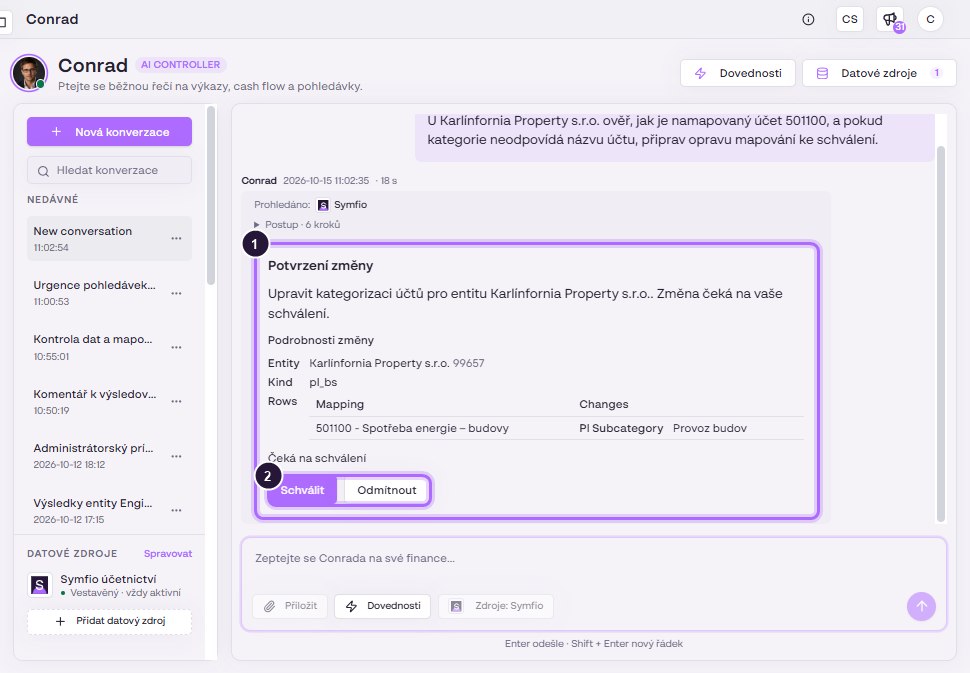
- The Change confirmation card with description and details.
- Approve writes the change, Reject discards it (“Rejected. Nothing changed.”).
Approve with care: changes affect the statements of all users of the company. Approve only changes you understand and check mapping changes in Categorization › Mapping.
How to ask for a useful answer
- Name the company, period and comparison. “Overhead costs of Karlínfornia Property for Q3 2026 by cost centre against Q2” works better than “What are our costs?”.
- Ask for a format. “Answer with a table account / issue / amount / recommendation.”
- Ask where the number comes from. “List the journal entries that make up this amount.” Verify them in Reports › Source data.
- Save recurring tasks as a skill (see Conrad skills).
- Find inspiration in Conrad – use cases.
Limitations
- Data freshness. Conrad answers from data loaded in Symfio and points out the date of the last update itself. Documents not yet synchronised are not visible.
- Verify key numbers in the report. Confirm amounts for management, the bank or the auditor in the Income statement, Balance sheet or Receivables and payables.
- Categorization drives answer quality. Conrad cannot classify or comment on unmapped accounts correctly.
- Long analyses. Complex questions may end with “The connection ended before the answer was saved”. Click Try again; Conrad continues and usually answers on the second attempt. Splitting the question into smaller parts also helps.
FAQ
Can Conrad change data or settings?
Only through the Change confirmation card that you approve. Nothing is written without approval.
Why can’t Conrad see a company?
You do not have access to it or its data has not been loaded yet. Check Companies › Users and Data sources.
What is the difference between Conrad and Claude connected through MCP?
Conrad lives in the app and needs no setup. Use the MCP connection when you want to work with Symfio data in your own Claude, see Connecting Claude to the Symfio MCP server.