Skills are saved instructions that tell Conrad how to prepare a report or analysis. Use them when you want the same type of output repeatedly (a monthly income statement commentary, an inconsistency check, the view of an “experienced finance person”) and do not want to write a long brief every time.
Before you start
- Permissions: every Conrad user can create a skill. Only its owner can edit a skill.
- Time required: 5 minutes for the first skill.
- Have ready: a brief you have already given Conrad successfully and want to repeat; ideally also a sample of the output you liked.
The Conrad skills page
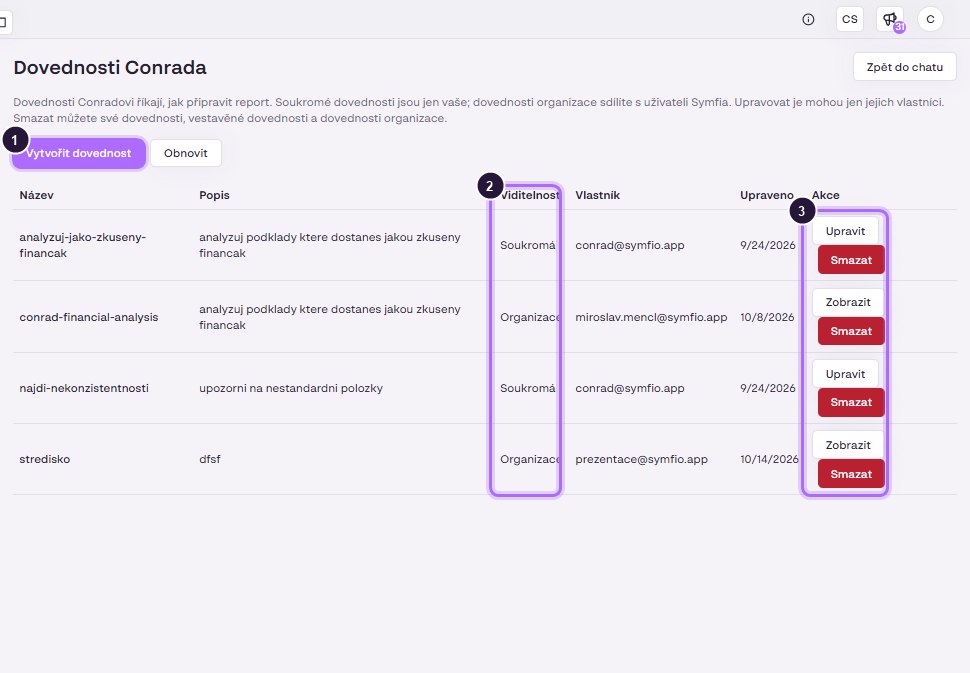
Open the page with the Skills button in the Conrad header (address go.symfio.app/en/conrad/skills). At the top there is an explanation (quoted from the Czech UI):
Skills tell Conrad how to prepare a report. Private skills are yours only; organisation skills are shared with Symfio users. Only their owners can edit them. You can delete your own skills, built-in skills and organisation skills. (Czech: Dovednosti Conradovi říkají, jak připravit report. Soukromé dovednosti jsou jen vaše; dovednosti organizace sdílíte s uživateli Symfia. Upravovat je mohou jen jejich vlastníci. Smazat můžete své dovednosti, vestavěné dovednosti a dovednosti organizace.)
The page has the buttons Create skill, Refresh and the Back to chat link. The skills table has the columns Name, Description, Visibility, Owner, Modified and Actions (Edit, Delete).

Skill types by visibility
| Visibility | Who sees and uses it | Who edits it |
|---|---|---|
| Private | Only you. | You (the owner). |
| Organisation | All Symfio users in your organisation. | Only the owner; others can use it. |
| Built-in | Everyone; provided by Symfio as default procedures. | Cannot be edited; can be deleted from your list. |
Tip: start with a private skill, fine-tune it over a few conversations and only then share it as an organisation skill. Colleagues then get a proven procedure and consistent outputs.
Creating a skill
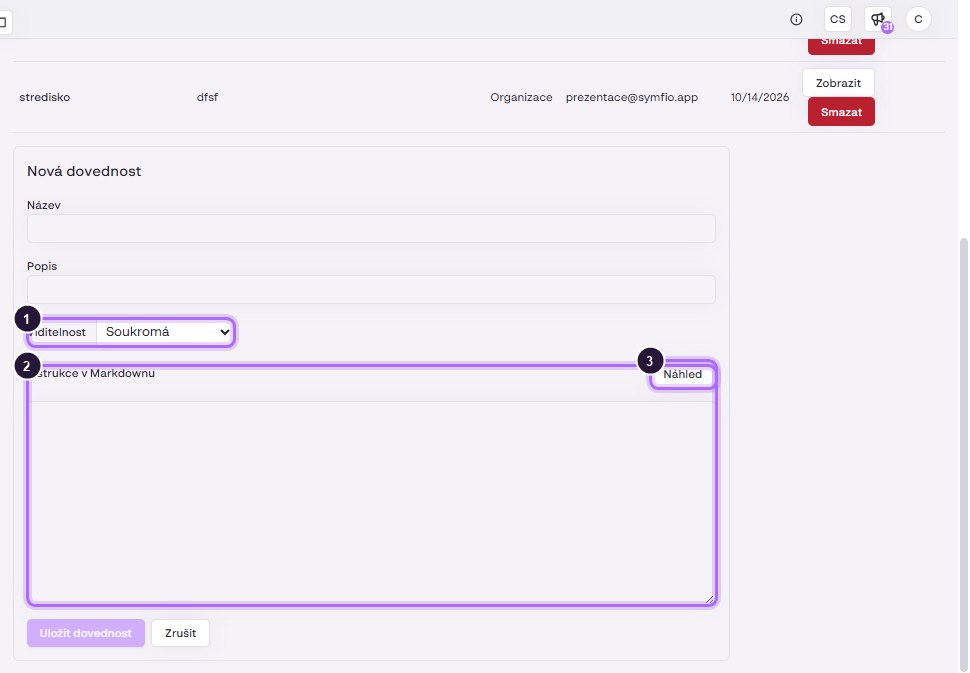
- In Conrad click Skills and then Create skill.
- Enter a Name. Use a short name without diacritics or spaces, for example
monthly-income-statement-commentary; it is then easy to pick in chat. - Fill in the Description / instructions: what Conrad should do, in what structure it should answer and which rules it should follow (see How to write a good skill).
- Choose the visibility (Private or Organisation) and save the skill.
- Return with the Back to chat link. If you do not see the new skill in the list, click Refresh.
Using a skill in chat
- Open a conversation in Conrad (or start a + New conversation).
- Next to the input field click the Skills button and select the skill from the list.
- Write the specific brief: company, period and any clarification, for example “Karlínfornia Property, September 2026”.
- Send with Enter. Conrad prepares the answer according to the instructions in the skill.
A skill does not replace the brief. It tells Conrad how to work; what and for which period to analyse must still be stated in your question.
Example skills
| Name | Description in the demo | Purpose |
|---|---|---|
analyzuj-jako-zkuseny-financak |
analyzuj podklady ktere dostanes jakou zkuseny financak (analyse the material you receive like an experienced finance person) | Conrad looks at the data through the eyes of an experienced CFO: it finds the result drivers, comments on margins and trends, flags risks and suggests what to ask the accountant. |
najdi-nekonzistentnosti |
upozorni na nestandardni polozky (flag non-standard items) | Conrad goes through the data and lists unusual items: jumps against previous months, entries on atypical accounts, duplicates, missing categorization. |
Further ideas: closing-commentary (a fixed structure of the monthly commentary for management), mapping-check (verification that 5xx/6xx accounts have an income statement category assigned), overdue-receivables (a list of debtors by urgency with a recommended next step).
How to write a good skill
Write the skill as an instruction for a new colleague who sees your data for the first time. A proven structure:
- Role and goal: in one sentence, who Conrad is and what should be produced. “You are the group controller. Prepare the monthly income statement commentary for management.”
- Output format: describe the structure precisely. “1) a 3-sentence summary, 2) a table Revenue / Gross profit / Operating profit / Net profit with the columns actual, plan, Δ, Δ %, 3) the three largest variances with explanation, 4) recommendations.”
- Rules: how to handle numbers and language. “Amounts in CZK thousands without decimals. Variances always against the plan in the Main scenario. Use the category names from Symfio. Answer in English.”
- Exceptions: what to ignore or handle separately. “Exclude intercompany transactions. Do not comment on items below CZK 50 thousand individually, summarise them as Other. If there is no plan, say so and compare with last year.”
- Sources: require traceability. “For every variance state the account and document it comes from.”
Tip: fine-tune the skill iteratively. Run it, compare the output with what you would write yourself, and add the missing rule to the instructions via Edit. After three or four rounds the output is usually stable.
Warning: do not put specific numbers or “correct” results into a skill for Conrad to confirm. A skill should describe the procedure and the format; Conrad always takes the data from the current state in Symfio.
Managing skills
- Edit: click Edit in the Actions column; available only for skills you own.
- Delete: click Delete in the Actions column. You can delete your own skills, built-in skills and organisation skills.
- Refresh: reloads the current list, for example after a colleague added a new organisation skill.
Frequently asked questions
Can I edit an organisation skill created by a colleague?
No. Only the owner can edit a skill. You can use it, or create your own private skill with the same instructions and adjust it to your needs.
Can I use several skills in one question?
Select the one skill that best matches the task. If you often combine two procedures, merge them into one new skill.
Can a deleted built-in skill be restored?
Built-in skills are provided by Symfio. If you deleted one and want it back, contact Symfio support.
Does Conrad see more data with a skill than without it?
No. A skill changes only the way of processing and the format of the answer. Permissions for companies and data stay the same.