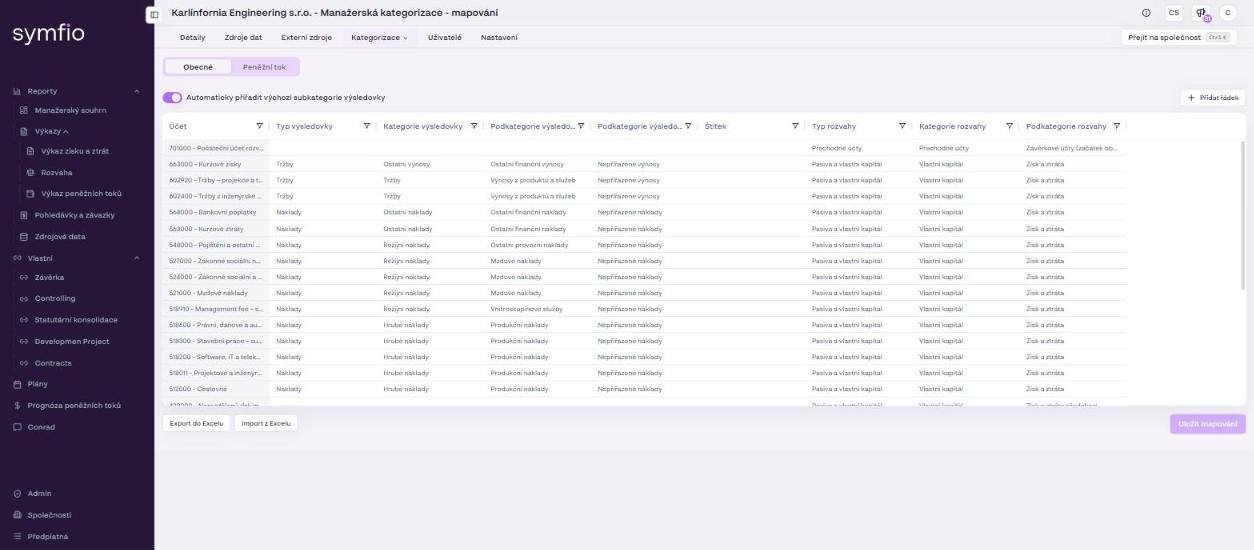
Once the setup is complete, the income statement automatically loads all items that have a PL Type assigned. The data is then displayed according to the configured PL categories and subcategories.
Before you start
- Permissions: an account with the Administrator role that may edit Settings and Categorization for the given company.
- Time required: the whole setup including mapping takes 90–120 minutes; this overview takes 5 minutes to read.
- What to prepare: imported or connected accounting data (the Data sources tab shows Connected) and an idea of the income statement structure you need – for example the main groups of costs and revenue you want to track separately.
Important: Symfio ships with predefined main PL categories (Revenue, Cost of sales, Overheads, Other expenses, Other income). As part of regular setup you create your own subcategories. If you need a new main PL category, this is handled as a custom change – contact the Symfio team.
How categorization works
The income statement structure is created in three consecutive steps. All of them are in the company detail (Companies › selected company).
- On the Settings tab check the income statement categorization parameters – what it is based on (Account, optionally Centre, Contract, Activity) and which account classes are revenue and expenses. Details in Setting up basic configuration.
- On the Categorization › Categories tab create the subcategories you want to use in the income statement (Managing categories).
- On the Categorization › Mappings tab assign each account to the matching PL category and subcategory (Mapping accounting data).
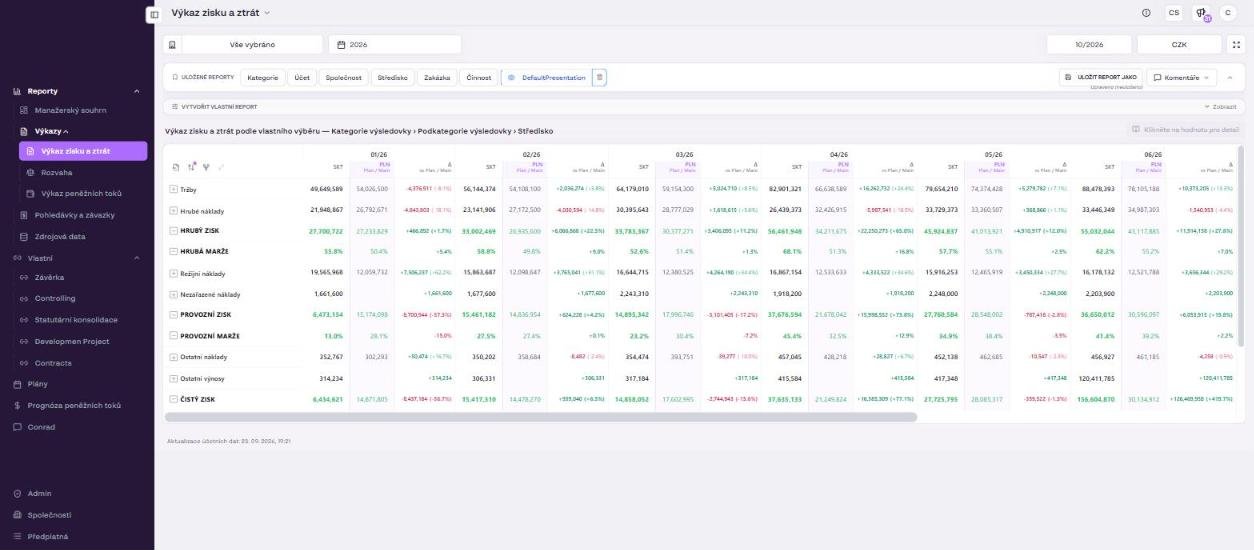
The Income statement report then loads all items with a defined PL Type. The report rows (Revenue, Cost of sales, GROSS PROFIT, Overheads, OPERATING PROFIT, Other expenses, Other income, NET PROFIT, EBITDA and margins) are calculated from the PL categories; subcategories form the further hierarchy levels, which you expand with the + button next to a row.
Tip: First prepare a simple structure of categories and subcategories outside Symfio, for example in Excel. When mapping afterwards you will know where each item belongs.
Troubleshooting common issues
| Problem in the report | What to check |
|---|---|
| An item does not appear in the income statement | Check that the account has a PL Type set and that the mapping was saved with Save mappings. |
| An item is in the wrong category | Check the PL Category and PL Subcategory under Mappings. |
| An item is shown too generically | Add or adjust the PL Subcategory 2. |
| The same account is displayed differently | Check the account’s mapping for individual cost centres (applies when categorizing by departments). |
| The application shows a warning above the mapping table | Complete the missing categorization or unify the differing mappings of the same account and centre combination. |
| A change is not visible in the report | Reports are recalculated within about 1 hour after saving; the time of the last update is shown in the report footer. |
Tip: After the first setup, run a check for at least one closed period whose figures you know from accounting. That way you can easily verify that both the income statement structure and the classification of items are correct. The procedure is described in Checking the income statement.
Result of the setup
After completing all steps you have your own income statement structure by PL categories and subcategories. The Income statement report (menu Reports › Statements) then gives you an overview of revenue and costs in a breakdown that matches your internal reporting – including the comparison with the plan scenario in the PLN and Δ columns.
Frequently asked questions
Do I have to use all three levels (category, subcategory, subcategory 2)?
No. Only the PL Type is mandatory. We recommend always filling in the category and subcategory; use subcategory 2 only when your reporting needs require it.
Can each company in a group have a different income statement structure?
Yes, categories and mappings are set per company. For a consolidated view, however, it is advisable to use the same subcategory names in all companies so that the rows add up correctly.
Does changing the structure affect historical data?
No. The mapping is applied to all loaded periods; you can change the structure at any time without losing data.